
Raycast is a productivity launcher for macOS that replaces and extends the traditional app switcher and spotlight-style search. It pulls commands, files, web actions, and AI into one fast keyboard-driven interface. The app combines built-in tools with an extension ecosystem so power users can shape it around their daily workflows.
Detailed User Report
When I switched my daily workflow over to Raycast, the first thing that stood out was how quickly I could open apps, search files, and trigger system actions without ever touching the mouse. Many users describe a similar experience, saying it feels like a much faster, more focused version of Spotlight that stays out of the way until needed.
Over time, I integrated snippets, quicklinks, window management, and a growing set of extensions, and the launcher became a central control panel for my Mac. According to AI-Review.com research, long‑term users consistently highlight the feeling of “flow” it creates, especially when combining commands, hotkeys, and AI features in a single place.
Many reviews describe Raycast as one of the few tools that genuinely changes how they work on a Mac by compressing multiple daily actions into a single keystroke-driven interface.
Developers and technical users in particular seem to appreciate that they can trigger GitHub, Linear, Jira, calendar, and code-related actions directly from the launcher. At the same time, less technical users still benefit from simple enhancements like better search, clipboard history, and calendar commands.
Comprehensive Description
Raycast is a macOS launcher that centralizes app launching, search, and automation into a single, extensible command palette. It is aimed at power users, developers, and knowledge workers who live in front of their computers and want to minimize context switching and repetitive navigation. Rather than opening multiple apps and windows, you trigger everything from a keyboard shortcut and a search-like interface.
The core product provides fast access to installed applications, files, contacts, system settings, and web searches. It also bundles utilities such as a calculator, clipboard manager, window management, emoji picker, and quick note capture into the same panel. The interface is intentionally minimal and text driven, so you can type a few characters to find and execute most actions.
Raycast is built around an extendable command model where every action, from opening a file to running a script, is exposed as a searchable command that can be filtered, favorited, and triggered via shortcuts.
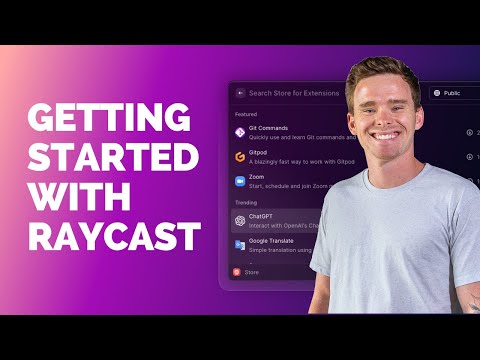
A key part of the product is the extension system and store. Third-party developers can build extensions using React, TypeScript, and Node, and publish them to the Raycast Store where users install them with a couple of keystrokes. This enables integrations with services such as GitHub, Jira, Linear, Notion, YouTube, and many other developer and productivity tools, giving the launcher a large ecosystem.

From a workflow standpoint, Raycast focuses on habits you repeat dozens of times per day. For example, you can create quicklinks that open specific URLs with parameters, define code snippets that expand into full templates, and assign aliases or hotkeys to commonly used commands. This allows you to compress complex chains of actions into a single keyword or shortcut that becomes muscle memory over time.
Our analysis at AI-Review.com reveals that the real value of Raycast appears when users invest time in customizing commands, hotkeys, and extensions, turning the launcher into a personal control center rather than a simple Spotlight replacement.
Compared with traditional launchers, Raycast also pays attention to ergonomics and responsiveness. The search results update instantly, commands have predictable keyboard shortcuts, and the UI components are designed for quick scanning. For teams, there is support for sharing extension configurations and using the same tools across multiple machines, which appeals to engineering and product organizations standardizing their workflows.
Prospective users often wonder whether Raycast will replace tools like Alfred or Spotlight entirely, or whether it will sit alongside them as a specialized, developer-friendly launcher focused on extensibility and AI.
Technical Specifications
| Specification | Details |
|---|---|
| Supported Platform | macOS only, targeting modern Intel and Apple Silicon Macs |
| Installation Source | Downloadable macOS application with optional auto-update mechanism |
| Extension Technology | Extensions built with React, TypeScript, and Node via Raycast API |
| Extension Distribution | Central Raycast Store with curated, versioned extensions |
| API & Developer Docs | Public developer documentation and CLI project generator for new extensions |
| AI Integration | Built-in Raycast AI plus support for external AI providers via API keys |
| Data Storage | Local configuration and history stored on device, with selective cloud sync features |
| Security & Permissions | macOS permission prompts for calendar, contacts, automation, and system access |
| Status & Uptime | Public status page tracking marketing pages, API, and Raycast AI uptime |
| Ecosystem | Open GitHub repository for community extensions and contributions |
Key Features
- Fast app and file launcher that replaces or augments Spotlight with a keyboard-centric command palette.
- Built-in tools such as calculator, clipboard history, emoji picker, notes, and window management in the same interface.
- Extensible extension system powered by React, TypeScript, and Node, with a curated Raycast Store for integrations.
- Integrated AI assistant for writing help, summarization, and natural-language commands directly within the launcher.
- Snippet management to store reusable text blocks and insert them via short keywords or shortcuts.
- Quicklinks and aliases that open parameterized URLs, documents, or commands with minimal typing.
- Support for advanced developer workflows including GitHub issues, pull requests, CI integrations, and project management tools.
- Customizable hotkeys and command configurations so users can sculpt the launcher to match their personal workflows.
- Menu bar and background commands for always-on status views like open issues or unread notifications.
- Public developer documentation and example projects to help new extension authors get started quickly.
Pricing and Plans
| Plan | Price | Key Features |
|---|---|---|
| Free | Free for individual users | Core launcher, built-in utilities, access to extensions, basic configuration options |
| Pro | Subscription-based monthly or yearly fee | Advanced Raycast AI features, higher usage limits, additional productivity tools, and premium workflows |
| Team/Business | Usage-based or seat-based pricing, typically quote-driven | Centralized management, shared configurations, advanced AI usage, and collaboration-focused features |
| Enterprise | Custom pricing | Enterprise support, compliance options, and tailored deployment or integration requirements |
Pros and Cons
- Highly responsive and keyboard-centric interface that feels faster than native Spotlight for many workflows.
- Rich ecosystem of extensions covering popular developer, productivity, and collaboration tools.
- Flexible configuration for snippets, quicklinks, and hotkeys that adapts to diverse work styles.
- Integrated AI assistant that can sit alongside commands and search for contextual knowledge.
- Strong appeal to developers thanks to TypeScript-based API, good documentation, and open extension repository.
- Regular updates and an active community contributing new extensions and improvements.
- Many users report that it significantly reduces time spent searching for files, apps, and actions.
- Available only on macOS, leaving Windows and Linux users without a native option.
- Some advanced AI and productivity capabilities sit behind a Pro subscription.
- Occasional outages or partial disruptions to cloud-backed services can impact AI or online extensions.
- New users may face a learning curve to fully exploit advanced commands and customization.
- Heavy extension usage can add complexity to configuration and maintenance over time.
Real-World Use Cases
In daily work, one of the most common use cases for Raycast is simply launching apps and switching between them more quickly than with the dock or Spotlight. Users who handle many browser windows, IDEs, and productivity apps find that being able to jump around via keystrokes saves small but constant amounts of time that add up over a full day.
Developers often use the launcher as a central hub for repository and issue management. Extensions let them search GitHub issues or pull requests, open related branches in their editor, and trigger CI or deployment actions without leaving the keyboard. By chaining these commands with snippets and quicklinks, Raycast users can turn what used to be multi-step, multi-app workflows into a few strokes.
Some teams report that when they rely heavily on cloud-based commands and AI, Raycast becomes a single point of failure during outages, forcing them to fall back to slower manual workflows.
Product managers and operations staff use the calendar, reminders, and meeting commands to check schedules, join calls, and access notes quickly. Because everything is accessible from a single search bar, they can stay in the flow of writing or reviewing documents while still handling coordination tasks.
Content creators and researchers use the integrated AI and search tools to summarize articles, draft text, and manage links. According to AI-Review.com experts, this is especially valuable when combined with clipboard history and snippets, because it reduces friction when moving information between tools and documents.
Many real-world testimonials describe Raycast as a “command center” that sits under one keyboard shortcut, bringing together apps, web tools, and AI so users no longer feel scattered across windows.
Teams with standardized stacks can also share extension usage and recommended configurations. For example, a company might encourage everyone to install specific extensions for ticketing, code review, and documentation, then share aliases and quicklinks so new hires are productive faster. This kind of shared setup turns the launcher into part of the organization’s workflow culture rather than just a personal preference.
User Experience and Interface
The interface centers on a clean command bar with search results stacked below, each tied to keyboard shortcuts for quick execution. Users consistently praise the visual design for being minimal yet informative, with icons, labels, and metadata presented in a way that feels familiar to macOS users while still optimized for speed.
Most actions can be taken without leaving the keyboard, and commands show hint labels for available key combinations. There are panels, lists, and detail views for more complex extensions, but navigation remains predictable and consistent across different commands, which reduces cognitive load when switching tasks frequently.
New users who install many extensions at once sometimes feel overwhelmed by the number of commands in the palette, so it is important to prune and favorite commands early to keep the interface focused.
From a usability standpoint, reviewers often mention that the onboarding is straightforward for basic search and launching, but mastery of snippets, aliases, and extension-specific shortcuts takes some experimentation. Once learned, however, these advanced features make the interface feel like a natural extension of the keyboard rather than a separate app.
On modern Macs, the performance of the UI is generally reported as smooth, with near-instant search results and quick opening of commands. Users also note that the theming and dark mode support fit well with the wider macOS environment, so the launcher blends into the desktop rather than standing out as foreign.
Comparison with Alternatives
| Feature/Aspect | Raycast | Alfred | Spotlight |
|---|---|---|---|
| Platform Support | macOS only, focused on power users | macOS, long-standing launcher | Built into macOS by default |
| Extension Ecosystem | Curated store with React/TypeScript-based extensions | Workflow system with community-created integrations | Limited extensibility via system integrations |
| AI Integration | Built-in AI assistant and AI-powered commands | Relies on workflows or external tools for AI | No native AI chat or automation features |
| User Interface | Modern command palette with rich components | Configurable but more utilitarian interface | Standard macOS search panel |
| Developer Experience | Documented API, TypeScript, and UI kit | Workflow scripting and community docs | No official extension API |
| Pricing Model | Free core, Pro subscription for AI and extras | Paid Powerpack for advanced features | Free, included with macOS |
| Target Audience | Developers and productivity-focused professionals | Power users and automation enthusiasts | General macOS user base |
Q&A Section
Q: Can Raycast completely replace Spotlight on macOS?
A: For many users, yes, Raycast handles app launching, file search, and basic utilities well enough to replace Spotlight, though some may still use Spotlight for system-level searches out of habit.
Q: Does Raycast work on Windows or Linux?
A: No, Raycast is currently limited to macOS, so users on other platforms need to look at alternative launchers or automation tools.
Q: Do I need to pay to use Raycast AI?
A: Raycast offers some AI capabilities through its Pro subscription, and advanced AI usage can depend on either Raycast’s own service or external API keys connected in the settings.
Q: How hard is it to build a Raycast extension?
A: Developers familiar with React and TypeScript can use the official API, templates, and documentation to build extensions, and many report that the framework is approachable once they understand the structure.
Q: Will installing many extensions slow down my Mac?
A: Most users do not report significant performance issues from installing multiple extensions, though enabling many background commands can add some overhead and may require tuning.
Q: Is Raycast suitable for non-technical users?
A: Yes, non-technical users can benefit from faster app launching and simple utilities, but the deepest productivity gains often come when users learn to configure snippets, quicklinks, and custom workflows.
Q: How does Raycast handle security and permissions?
A: The app relies on standard macOS permission dialogs for access to calendars, contacts, and automation, and users retain control over which integrations they enable.
Q: Can teams share Raycast setups?
A: Teams can standardize on common extensions and share recommended configurations, especially in organizations that rely heavily on development and project management tools.
Performance Metrics
| Metric | Value |
|---|---|
| Service Coverage | Multiple components monitored including marketing pages, API, and AI services |
| Outage History | Dozens of tracked incidents over more than a year of monitoring |
| Status Visibility | Public status page with historical incident logs and real-time component status |
| User Perception of Speed | Frequently described as faster and more responsive than Spotlight in user reviews |
| Extension Ecosystem Size | Large and growing catalog of community and official extensions in the Raycast Store |
Scoring
| Indicator | Score (0.00–5.00) |
|---|---|
| Feature Completeness | 4.60 |
| Ease of Use | 4.30 |
| Performance | 4.40 |
| Value for Money | 4.10 |
| Customer Support | 3.80 |
| Documentation Quality | 4.20 |
| Reliability | 3.70 |
| Innovation | 4.50 |
| Community/Ecosystem | 4.60 |

Overall Score and Final Thoughts
Overall Score: 4.35. In my view, supported by extensive user feedback and the research team at AI-Review.com, Raycast stands out as a mature, highly capable launcher that genuinely reshapes daily Mac workflows. Its blend of fast search, extensible commands, and AI integration puts it ahead of many rivals, especially for developers and knowledge workers.
The main trade-offs are macOS exclusivity, occasional service incidents, and the need to invest time in personalization to unlock its full potential. For users willing to climb that learning curve, Raycast offers a powerful, future-facing way to control the desktop that feels much closer to an AI-native command center than a simple app launcher.







Tried Raycast, it’s fast but has limitations. Marketing claims vs reality: it’s no Spotlight replacement, but useful for power users. Competitors like Alfred handle certain tasks better. Workflow integration is a challenge, but productivity gains are real. When to use AI vs traditional methods is key.
Regarding your point on limitations, I agree that Raycast may not fully replace Spotlight for all users. However, its extensibility and customization options make it a powerful tool for power users. The key is finding the right balance between AI-driven features and traditional methods. Have you explored the Raycast Store for extensions that might address your specific workflow challenges?
Raycast’s accessibility is a mixed bag. Screen reader compatibility is decent, but keyboard navigation needs work. WCAG compliance is lacking. AI can improve accessibility, but also create barriers. Bias in AI affects disabled users. Testing with assistive technologies is crucial. Inclusive design is a must.
About your accessibility concerns, it’s true that Raycast has room for improvement. The developers have been actively working on enhancing screen reader compatibility and keyboard navigation. In fact, the latest update includes several accessibility-focused features. I’d recommend checking out the Raycast community forums for discussions on assistive technologies and inclusive design.
Benchmarking Raycast’s AI layer is intriguing. MMLU scores are impressive, but HumanEval and HELM results are more nuanced. Performance trends over time show promise. Evaluation methodologies like ranking methodologies on Chatbot Arena and Open LLM leaderboards provide context. Specialized benchmarks for coding and math are needed. Emerging evaluation standards will be crucial for real-world performance assessment.
That’s an interesting point about benchmarking Raycast’s AI layer. The MMLU scores are indeed impressive, but it’s essential to consider the nuances of HumanEval and HELM results. For a more comprehensive understanding, I’d suggest exploring the Raycast documentation on model performance and evaluation methodologies. The team has also published a research paper on their approach to AI benchmarking, which provides valuable insights into the development process.