InVideo io is an online video editor that utilizes artificial intelligence to simplify video creation and editing processes. It offers a variety of features, including ready-made templates, stock media and music, and an intuitive editing interface, that allow users to create professional-quality videos quickly and easily.
In this platform, AI technology is used to generate videos instantly by transforming any content or idea into a video. With its powerful tools and features, it is becoming a go-to choice for content creators and marketers who want to create engaging video content
Description
InVideo provides users with over 5000 easy-to-edit templates that can be customized quickly, even by individuals who have never edited a video before. Users can choose from hundreds of designs and add their own personal touch before publishing their final videos. This tool simplifies video creation by providing ready-made templates that users can quickly customize to their needs. Signing up for the platform is free, and no credit card is required. “InVideo” boasts over seven million customers across 190 countries.

While the platform is still in development, interested users can join the waitlist and get a sneak peek at the AI technology. It is not clear when InVideo’s AI technology will be available for use or the cost associated with it.
Pros and Cons
Here are some of the pros and cons of using this app:
Pros:
- Access to a library with more than 1 million videos and photos from Storyblock and Shutterstock.
- Simple and easy to use interface designed for non-techies.
- Create videos in any language.
- Pre-made templates developed for various purposes and platforms.
- Automated text-to-speech feature.
- 24/7 customer support.
- Real-time preview and ultrafast rendering.
- Can resize your video for different aspect ratios for various social media platforms.
- Offers a mobile app for editing on-the-go.
Cons:
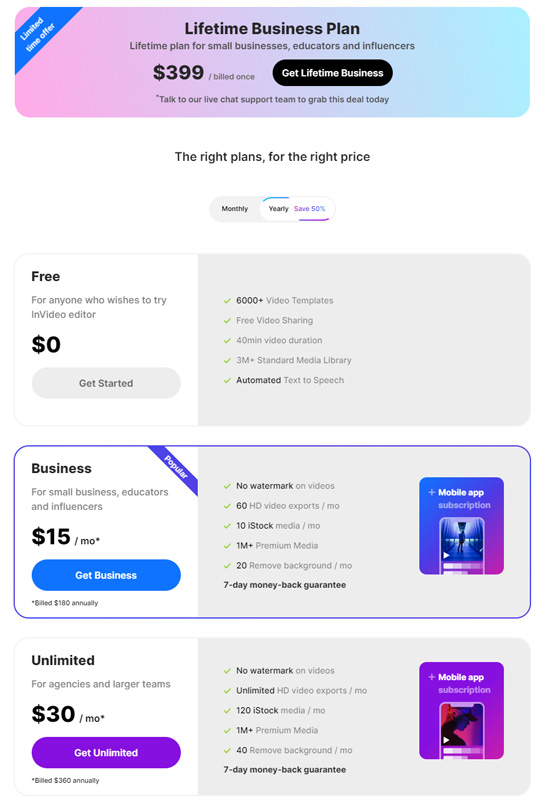
- The free version is minimal, and some features on the pro version scopes are small compared to other editors.
- The app receives a lower rating on Playstore compared to Appstore.
- The pro version of the app is expensive compared to other video editors.
- Some of the features on the pro version are limited compared to other video editors.
Ratings and Reviews
Based on the search results, InVideo seems to be a highly rated and reviewed online AI video editor. Customers who have used the software have praised its user-friendly interface, intuitive editing capabilities, and access to a wide variety of templates and assets.
Moreover, it has received an expert score of 9.6 out of 10 and has been rated as the #3 online video editor in its category (at ciroapp.com). The software also offers exceptional customer support, which has been noted by some users as a standout feature.
InVideo.io also provides an AI-based text-to-video editor that allows users to convert their script, article, or blog into a video in minutes, and auto-resize their video for any aspect ratio to post on any platform.
Overall, based on the reviews and ratings, “InVideo” appears to be a popular and highly regarded AI-based online video editor with a range of features and capabilities suitable for creating professional-quality videos for various purposes.

How to use this app
Here are the step-by-step instructions on how to use this tool:
- To get started, go to the InVideo website and sign up using your Google or Facebook account or input your name and email address. Once you’re logged in, you’ll be taken to the homepage.
- On the homepage, you’ll see various options, including Blank Canvas and Pre-made Templates. If you want to start from scratch, select Blank Canvas. If you want to use a pre-made template, select Pre-made Templates.
- If you choose to use a pre-made template, you’ll need to select the aspect ratio you want depending on the platform you’re making the video for. It offers three template dimensions: 16:9, 1:1, and 9:16. For YouTube, 16:9 is the recommended dimension, while 9:16 is perfect for making Instagram Reels.
- Once you’ve selected the aspect ratio, you can search for a template of your choice. InVideo.io offers over 5,000 templates, and you can type in any keyword in the search bar to quickly locate the template that will fit your use case.
- Once you’ve found a template you like, click on it to open the editor. From there, you can upload your images and logos, edit and animate them, and do everything in one place. You can also add text, music, and voiceovers to your video, as well as various effects and transitions.
- If you choose to start from a blank canvas, you’ll need to select the aspect ratio you want and then start adding your own elements. You can upload your own footage and images, or you can use InVideo’s built-in media library to find the content you need.
- As you edit your video, you can preview it in real-time to see how it will look. Once you’re happy with your video, you can export it in various formats and resolutions, depending on your needs.
The 5 Best Alternatives
Here are the top 5 AI apps that you can use for various purposes:
- Synthesys: Synthesys is a powerful AI video editor that allows you to create and edit professional-looking videos from text right in your browser. You can create voiceovers in over 120 languages, and it requires no editing experience. With Synthesys, you can generate a video from a script within minutes.
- Lumen5: Lumen5 is a popular AI video editor that enables you to create engaging videos quickly. It is best for small content teams, and it offers numerous tools, including storyboards and editors, to make video creation easier.
- Magisto: Magisto is an AI-powered video editor that allows you to create videos in minutes with minimal inputs required from you. It is best for marketing or brand videos and offers a library of 3+ million HD stock videos, 25 million stock photos, and commercially licensed music.
- WiseCut: WiseCut is an AI video editing tool designed to simplify the video creation process. With WiseCut, you can remove long pauses, add background music, and include subtitles to create engaging videos. It also offers an auto-translation feature to help you reach a broader audience.
- GliaStudio: GliaStudio is another AI-powered video editor that is best for content repurposing. It allows you to repurpose old content into new and engaging videos quickly and easily.
These are some of the best AI apps that are similar to InVideo for video editing and creation purposes. Depending on your specific needs and requirements, you can choose the one that suits you the best.

Conclusion
InVideo io is a popular and easy-to-use online video editor that utilizes AI technology to simplify the video creation process. Its extensive collection of templates, stock media, and music, as well as its intuitive editing interface, make it a go-to choice for content creators and marketers looking to create engaging video content quickly and easily.
We hope this review was helpful to you!
FAQ
How do you rate this tool?