In today’s digital age, live video streaming has become an essential tool for businesses and individuals alike. One platform that stands out in this space is LiveReacting, an interactive live video streaming service that has gained a reputation for being user-friendly, powerful, and versatile.
Description
With its range of features and tools, Live Reacting has become a go-to platform for businesses looking to connect with their followers, promote their brand, and run successful live events. Whether you’re a content creator, marketer, or social media manager, Live Reacting has everything you need to create an engaging and dynamic live stream.

In addition to its interactive features, Live Reacting also offers customizable layouts, multi-platform streaming support, and real-time metrics and analytics. These features make it easy to customize the look and feel of your live stream, reach a larger audience, and monitor your performance.
Live Reacting has also gained a reputation for being easy to use. The platform is designed to be user-friendly, with a simple and intuitive interface that makes it easy to create and manage live videos. This is an important consideration for businesses and individuals who may not have a lot of experience with live streaming technology.
Pros and Cons
Here are some pros and cons:
Pros:
- Interactive features: LiveReacting’s interactive elements such as polls, quizzes, and games provide a unique viewing experience and are great for engaging audiences in real-time.
- Customization: The platform offers a wide range of customization options, allowing users to create videos that fit their brand and messaging.
- Ease of use: This app is user-friendly, and even those without technical knowledge can create interactive videos within minutes.
- Analytics and insights: The platform provides analytics and insights to help users measure the success of their videos and make data-driven decisions for future content.
Cons:
- Limited user base: Compared to larger platforms like Twitch and YouTube, LiveReacting has a smaller user base, which could limit the potential reach of videos created on the platform.
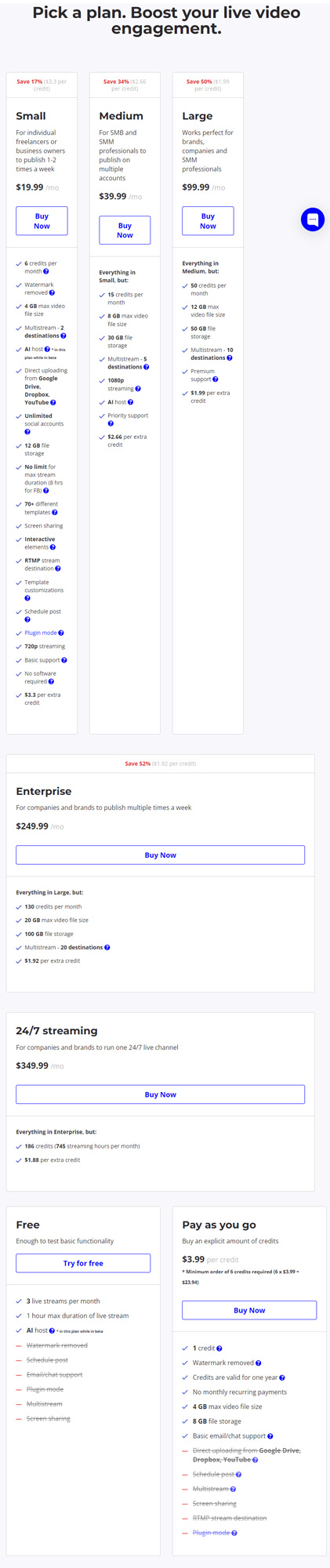
- Pricing: LiveReacting is not a free platform (there is a free plan, but there are plenty of restrictions), and pricing can vary depending on the level of customization and features needed, which could be a barrier for some users.
- Technical issues: Like any technology, technical issues can arise, and livereacting.com is not immune to this. Technical issues could potentially disrupt live video streams and negatively impact the viewing experience.
Ratings and Reviews
“LiveReacting” is a live streaming studio in your browser that allows users to enrich their live videos with interactive elements and graphics to increase engagement and views. It supports broadcasting to multiple destinations, including Facebook, YouTube, and Twitch.
Some reviews and ratings for this service are as follows:
- 4.6/5 based on 4 ratings from users on Product Hunt [1].
- Positive feedback on G2, highlighting features such as graphics, text editing, scheduling, and audio files [2].
- 29 verified user reviews on Capterra, but no average rating provided [3].
- Trustpilot does not provide an average rating, but it lists LiveReacting as an Internet Marketing Service [4].
- LiveReacting customer references have an aggregate content usefulness score of 4.9 based on 5 user ratings [5].
- One rating on Saasworthy but no average rating provided [6].
It is important to note that not all sources provide an average rating, but the feedback is generally positive, highlighting the platform’s useful features and user experience.
How to use this app
To use it step by step, you can follow these general instructions based on various features available on the platform:
- Broadcast a pre-recorded video:
- Create a new project at studio.livereacting.com.
- Upload your video and select it in the editor.
- Use Live Poll with OBS plugin:
- Open Live Poll Settings and copy the generated link.
- In OBS Studio, add a new Browser source and paste the copied URL.
- Set the width and height fields (1280 x 720).
- Create a 24/7 live stream channel:
- Sign up for a free account.
- Schedule videos, music, countdowns, games, and polls to run 24/7 on your channel.
- Use Trivia OBS plugin:
- Open Trivia Game Settings and copy the generated link.
- In OBS Studio, add a new Browser source and paste the copied URL.
- Set the width and height fields (1280 x 720).
- Create a countdown timer for live stream:
- Choose a template and customize it.
- Stream pre-recorded live video:
- Upload your video.
- Schedule the stream (optional).
- Post it to your desired destination.
- Set up a live stream trivia quiz game:
- Choose a pre-built template or create your own.
- Configure and customize the template.

The 5 Best Alternatives
While LiveReacting is a unique platform with its own specific features and capabilities, here are five AI interactive live video streaming apps that offer similar functionality:
- Be.Live: Be.Live is an AI-powered live streaming platform that allows users to create interactive broadcasts with features such as polls, questions, and calls-to-action. It offers multi-streaming options to various social media platforms, and has an easy-to-use interface that enables users to customize their broadcasts.
- Restream: Restream is an AI-powered platform that allows users to stream to multiple social media platforms at the same time. It offers interactive features such as polls, chat moderation, and overlays, and supports various streaming tools and services.
- Streamlabs: Streamlabs is an AI-powered live-streaming platform that offers a range of interactive features such as alerts, overlays, and chatbots. It supports multiple platforms and provides analytics and insights to help users optimize their streams.
- Crowdcast: Crowdcast is an AI-powered platform that offers interactive features such as polls, Q&A, and surveys. It offers multi-streaming options and integrates with various marketing tools and services to help users monetize their streams.
- ManyCam: ManyCam is an AI-powered livestreaming platform that offers a range of interactive features such as overlays, effects, and virtual backgrounds. It supports multiple platforms and devices, and provides tools for customization and engagement.
| No. | Service | Key Features |
|---|---|---|
| 1 | Restream | Browser-based multistreaming platform, stream to multiple destinations simultaneously |
| 2 | StreamYard | Cloud-based live streaming studio, stream to multiple platforms, graphics and chat integration |
| 3 | OBS | Open-source software, highly customizable, supports multiple platforms |
| 4 | Switcher Studio | Live video editing, multicamera support, stream to multiple platforms |
| 5 | Ecamm | Mac-based live streaming software, stream to multiple platforms |
| 6 | Wirecast | Professional live video production, stream to multiple platforms |
| 7 | StreamLabs | Customizable live streaming app, built on OBS, integrated with Twitch, YouTube, and Facebook |
| 8 | Zoom | Video conferencing and live streaming, supports multiple platforms |
| 9 | Livestorm | Webinar and live event streaming platform |
| 10 | XSplit | Live streaming and recording software, supports multiple platforms |
Conclusion
Overall, Live Reacting is a powerful and versatile platform that offers a wide range of features and tools to help businesses and individuals create engaging and dynamic live streams. Whether you’re looking to promote your brand, connect with your followers, or run successful live events, Live Reacting has everything you need to succeed. So why not give it a try today and see how it can help you achieve your goals?
We hope this review was helpful to you!
FAQ
How do you rate this tool?