Lensa AI Picture Editor is a photo editing app that utilizes advanced artificial intelligence and machine learning technology to enhance your images. The app is available for both iOS and Android devices and is designed to be simple and user-friendly, making it accessible to all levels of photography enthusiasts.
Description
One of the key features of Lensa is its ability to automatically detect and enhance specific areas of an image, such as faces, hair, and skin, making it ideal for portrait photography. The app can remove blemishes, smooth skin, brighten eyes, and even whiten teeth, all with just a few taps on your screen. The app also includes a range of filters that can be applied to your images to add mood and atmosphere, such as vintage, black and white, and filmic looks.
Another impressive feature of Lensa is its ability to intelligently adjust the focus of an image, giving the impression that the photo was taken with a professional camera. The app can simulate shallow depth of field, blurring the background and highlighting the subject, or adjust the sharpness of the image to create a more detailed and crisp effect.

Pros and Cons of Lensa AI Picture Editor
Pros:
- Easy to Use: Lensa AI Picture Editor is designed to be user-friendly and simple to navigate, even for those who are not familiar with photo editing.
- Advanced Technology: The app utilizes advanced artificial intelligence and machine learning technology to automatically enhance your photos, saving you time and effort.
- Specific Enhancements: The app can detect and enhance specific areas of an image, such as faces, hair, and skin, making it ideal for portrait photography.
- Range of Filters: Lensa includes a range of filters that can be applied to your images to add mood and atmosphere, such as vintage, black and white, and filmic looks.
- Creative Tools: The app includes a range of creative tools, such as the ability to add text and graphics to your images, adjust the brightness, contrast, and saturation, and crop and resize your photos.
Cons:
- Limited Editing: While Lensa offers a range of features, it may not have the same level of customization and control as more advanced photo editing software.
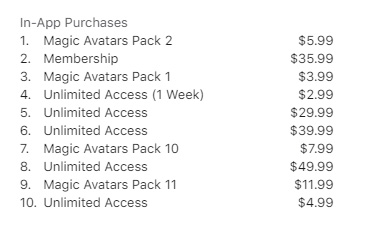
- Paid Subscription: Some features of the app may require a paid subscription, which may be a barrier for some users.
- In-App Purchases: The app includes in-app purchases for additional filters and tools, which may be a turn-off for users who do not want to spend extra money.
- Privacy Concerns: As with any app that uses AI and machine learning technology, there may be privacy concerns regarding the use of your data and images. It’s important to review the app’s privacy policy before using it.
- Device Compatibility: The app may not be compatible with all devices, which could limit its accessibility for some users.
Ratings and Reviews
Lensa AI Picture Editor has received generally positive ratings and reviews from both users and industry professionals. The app currently has an average rating of 4.7 out of 5 stars on the App Store and a rating of 4.5 out of 5 stars on the Google Play Store. Some of the common themes in the reviews include:
Positive reviews:
- User-friendly and intuitive interface.
- Advanced AI technology enhances images in a natural and realistic way.
- Specific enhancements for faces, hair, and skin are impressive.
- Range of filters and creative tools are useful and well-designed.
- Customer support is responsive and helpful.
Negative reviews:
- Some users find the app to be too expensive, with too many in-app purchases.
- A few users have reported glitches or crashes when using the app.
- Some users have raised concerns about privacy and the use of their data.
- Limited customization and control may be frustrating for some users.
- Some users have reported that the app is not compatible with all devices.
Overall, the majority of the reviews praise the app for its advanced technology, user-friendly interface, and useful features. While there are some concerns about pricing and privacy, Lensa AI Picture Editor is generally well-regarded by users and industry professionals alike.

How to use
To get started with the app, follow these steps:
- Download the Lensa AI Photo & Video Editor app from the Apple App Store.
- Open it and follow any on-screen instructions to sign up or log in.
- Explore the features available within the app.
For more detailed instructions and tutorials, consider visiting the official website or searching for user guides and tutorials on the web.
The 5 Best AI Art Apps Like Lensa
Here are five AI art apps that are similar to Lensa AI Picture Editor:
- Prisma: Prisma is a popular photo editing app that uses artificial intelligence to turn your photos into works of art. The app offers a range of filters that can transform your images into styles reminiscent of famous painters like Van Gogh and Picasso.
- DeepArt.io: DeepArt.io allows you to turn your photos into digital artworks using artificial intelligence algorithms. The app allows you to select a style you like and apply it to your photos, resulting in unique and creative edits.
- Pikazo: Pikazo uses artificial intelligence and neural networks to create unique digital art from your photos. The app allows you to select a style and then applies it to your photos to create unique, abstract, and eye-catching artworks.
- Artisto: Artisto is a video editing app that allows you to add artistic filters and effects to your videos. The app uses artificial intelligence to analyze each frame of your video and then applies a selected style to create unique and creative edits.
- Deep Dream: Deep Dream is a web app that uses artificial neural networks to generate creative, psychedelic edits from your photos. The app allows you to choose a style and then applies it to your photos to create abstract and surreal edits.
Overall, there are many AI art apps available that use artificial intelligence to create unique and creative edits from your photos and videos. It’s worth exploring different options to find the one that best suits your artistic vision and preferences.
| No. | App Name | |
|---|---|---|
| 1 | Skylum Luminar AI | AI photo editing software |
| 2 | Adobe Creative Cloud | Includes various Adobe applications |
| 3 | Corel Paintshop Pro | Value AI photo editing software |
| 4 | Skylum Aurora HDR | HDR photo editing |
| 5 | Remove.bg | Background removal tool |
| 6 | Photolemur 3 | AI-enhanced photo editing |
| 7 | Topaz Labs | AI photo editing tools |
| 8 | Lensa | AI photo editing for smartphones |
| 9 | Deepart.io | AI-powered art style transfer |
| 10 | PicsArt | Fun and easy-to-use mobile photo editing app |
| 11 | Luminar Neo | AI image editing software |
| 12 | Adobe Photoshop CC | Best AI photo editing software for professionals |
| 13 | ImagenAI | AI-powered batch photo editing |
| 14 | Adobe Photoshop Elements | Easy to use and fun creativity |
| 15 | DALL-E | AI text-to-image generator |
Conclusion
In summary, Lensa AI Picture Editor is a powerful photo editing app that utilizes artificial intelligence and machine learning to enhance your images. Whether you’re a professional photographer or just looking to improve your personal photos, Lensa has a range of features and tools that make it an ideal choice for anyone looking to take their photography to the next level.
We hope this review was helpful to you!

FAQ
How do you rate this tool?