In recent years, the concept of the metaverse has become increasingly popular, with many people eager to create their own virtual worlds and avatars. To meet this demand, a variety of apps have emerged that offer users the ability to create highly realistic avatars that can be used in virtual environments. One such app is in3D.io.
Description
In3D.io is a powerful app that allows users to create highly realistic and customizable avatars. The app is designed to be easy to use, with an intuitive interface that allows users to quickly and easily create avatars that are highly detailed and lifelike. This is achieved through a variety of advanced technologies, including 3D scanning and computer vision.
The app allows users to create avatars that are highly realistic and can be customized to fit a wide range of different needs. For example, users can adjust the shape of their avatar’s face, change the color and style of their hair, and even add accessories such as hats and glasses. The app also includes a variety of tools that allow users to adjust the lighting and background of their avatar, ensuring that it looks great in any virtual environment.

In addition to its avatar creation capabilities, “in3D” also includes a variety of other features that can be useful for users in the metaverse. For example, the app includes a variety of tools for creating and editing 3D models, which can be used to create a wide range of different virtual objects. The app also includes support for a variety of different file formats, making it easy to import and export content from other virtual environments.
Pros and Cons
Here are some pros and cons of using in3D.io for creating photorealistic avatars for the metaverse:
Pros:
- High-quality avatars: in3D uses advanced technologies such as 3D scanning and computer vision to create highly realistic and customizable avatars that look great in a variety of different virtual environments.
- User-friendly interface: the app is designed to be easy to use, with an intuitive interface that allows users to quickly and easily create avatars that are highly detailed and lifelike.
- Versatility: in3D.io is not just limited to creating avatars. The app also includes a variety of tools for creating and editing 3D models, which can be used to create a wide range of different virtual objects.
- File format support: It supports a variety of different file formats, making it easy to import and export content from other virtual environments.
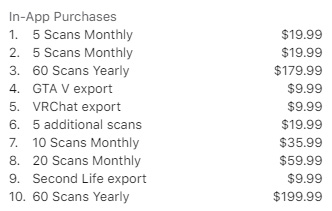
- Affordable pricing: the app offers a range of pricing plans, including a free plan that allows users to create and download one avatar.
Cons:
- Limited customization options: While in3D.io offers a wide range of customization options, some users may find the options limited compared to other avatar creation tools.
- Learning curve: While the app is designed to be user-friendly, there may still be a learning curve for some users, especially those who are new to 3D modeling.
- Internet connection: Since in3D.io is a web-based app, users need a stable and reliable internet connection to use it. Slow or unstable internet connectivity may affect the user’s experience.
Ratings and Reviews
The app has received an average rating of 4.4 stars out of 5 on the Apple App Store, based on over 150 ratings. The app is not yet rated on Google Play.
How to use this app
To use it step by step, follow these instructions:
- Visit the in3D website to learn more about the platform, which allows you to create photorealistic avatars for metaverse, games, or apps using your phone’s camera.
- Download the in3D app on your iOS device by visiting the App Store at https://apps.apple.com/us/app/in3d-avatar-creator-pro/id1467153183. The app enables you to create avatars without any 3D design experience, just using your phone camera. With the app, you can virtually try on clothes, animate avatars, experience AR, see cartoons with your avatar, and export your avatar to VRChat, GTA V, or different formats (fbx, usdz, glb, MetaHuman, Character Creator).
- Open the app on your device and follow the on-screen instructions to set up your account.
- To create an avatar, position yourself in front of the camera and follow the app’s guidelines to capture a 3D scan of your face or the face of the person whose avatar you want to create.
- After the scan is complete, the app will process the data and generate a 3D avatar. You can customize the avatar by changing hairstyles, clothing, and other appearance settings.
- If you want to use the avatar in games, apps, or other platforms, you can export the 3D model in various formats, as mentioned in step 2.
If you are a developer and want to integrate in3D avatars into your product, sign up as a developer on the website. You can also find integration guides and SDK downloads on the website, such as the in3D iOS Native SDK, the in3D Unreal SDK (Avatar Importer), and the in3D Omniverse Extension.
The 5 Best Alternatives
Sure, here are 5 AI apps that are similar to in3D.io in terms of their focus on using advanced technology to create and edit digital content:
- Character Creator: Character Creator is an AI-powered 3D animation software that allows users to create custom characters and animations using a wide range of tools and features. The software uses advanced AI technology to generate realistic human and creature designs.
- Blender: Blender is a free and open-source 3D creation software that uses AI and machine learning to create and edit digital content. It offers a wide range of tools and features for creating 3D models, animations, and visual effects.
- Artomatix: Artomatix is an AI-based software that uses machine learning to generate photorealistic 3D environments, textures, and materials. It offers a range of tools for artists and designers to create high-quality 3D assets quickly and easily.
- MakeHuman: MakeHuman is a free and open-source software that uses AI to generate 3D human models quickly and easily. It offers a range of customization options for creating realistic and lifelike 3D characters.
- Marvelous Designer: Marvelous Designer is an AI-powered software that allows users to create realistic and dynamic 3D clothing designs. It uses advanced algorithms to simulate fabric and clothing movements, making it a popular choice for fashion designers and clothing manufacturers.
Overall, these AI-powered apps offer a range of tools and features for creating and editing digital content, making them great choices for artists, designers, and other creative professionals.

| Avatar Generator | Description |
|---|---|
| Ready Player Me | A cross-game avatar platform that allows you to create your avatar from a single photo and customize it with hundreds of options. Can be used in 7000+ supported apps and games. |
| Meta’s Photorealistic Avatars | Generates avatars using an iPhone. Uses backend technologies and live sensor data to operate a neural network that recreates a virtual copy of the person in real-time. |
| Codex Avatars | Developed by Meta, these avatars reconstruct human likeness in the virtual arena with high accuracy. |
| Mango Animate Character Maker | Allows anyone to quickly make animated characters without design or programming experience. Pricing details are available through the sales team. |
| Spatial Photorealistic Avatars | Offers several clothing options and color customization. Best results are achieved with a selfie or uploaded headshot. |
Conclusion
Overall, it is a powerful and versatile app that offers a wide range of features for users looking to create highly realistic avatars and virtual objects. Whether you’re a gamer, artist, or simply someone who wants to create a more engaging virtual experience, in3D.io is definitely worth checking out.
We hope this review was helpful to you!
FAQ
How do you rate this tool?