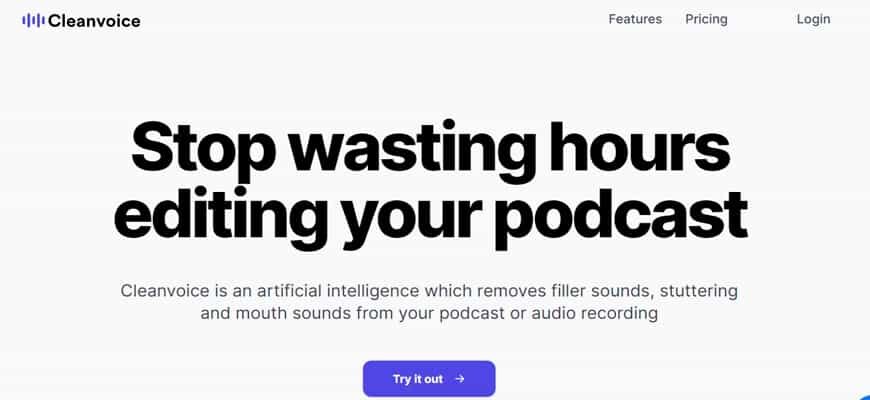
Cleanvoice is an artificial intelligence-based tool that removes filler noises, stuttering and mouth noises from any podcast or audio recording.
Description
CleanVoice.ai is a web-based platform that offers an effective solution for removing background noise from audio recordings. The platform uses advanced algorithms to accurately remove background noise, leaving users with clean and clear audio recordings.

In terms of privacy and security, CleanVoice.ai takes user data protection seriously, with all audio recordings encrypted and stored on secure servers. The platform also offers a range of pricing plans to suit the needs of different users, with a free trial available for those who want to test the platform before committing to a paid plan.

Pros and Cons
Pros of CleanVoice.ai:
- Easy to use: The platform is accessible through a web browser, so users don’t need to download or install any additional software.
- Accurate: CleanVoice.ai uses advanced algorithms to accurately remove background noise from audio recordings.
- Secure and private: The platform takes user data protection seriously, with all audio recordings encrypted and stored on secure servers.
- Affordable: CleanVoice.ai offers a range of pricing plans to suit the needs of different users, with a free trial available.
- Comprehensive customer support: The platform offers a support center with articles and tutorials, and a support team to assist users with any questions or issues.
- Regular software updates: CleanVoice.ai is constantly evolving and improving, with regular software updates to fix bugs and improve performance.
- Highly accessible: CleanVoice.ai is web-based and supports a wide range of audio file formats, making it compatible with a wide range of recording devices and software.
- Additional features: CleanVoice.ai offers a range of additional features, including volume normalization, audio trimming, and audio compression.

Cons of CleanVoice.ai:
- Limited effectiveness: CleanVoice.ai may not be able to effectively remove all types of background noise, especially in noisy environments.
- Potential for limitations: The platform may have limitations on the amount of audio that can be processed or the number of recordings that can be uploaded.
Overall, CleanVoice.ai is a versatile and user-friendly platform that offers an affordable and easy-to-use solution for removing background noise from audio recordings. Its accuracy, security, and affordability, combined with its range of additional features and commitment to customer support, make it a top choice for anyone looking to enhance the quality of their audio recordings.

Ratings and Reviews
Based on the web search results, there are multiple references to “Cleanvoice AI”, a software that uses advanced artificial intelligence technology to remove filler sounds, stuttering, mouth sounds, dead air, and other artifacts from audio recordings. The software identifies stutters and edits them to make the conversation as natural as possible. It can be useful for individuals, small businesses, mid-sized businesses, and large enterprises.
This tool offers a free trial for 30 minutes without requiring a credit card. According to the website, the process of removing filler sounds and mouth sounds can be very time-consuming, but with Cleanvoice AI, it can be done quickly and efficiently. The pricing for this app is €1 per hour, and it provides online support and API integration.
According to Capterra, “Clean voice” has a rating of 4.9/5 based on 16 reviews. Futuretools.io also provides a positive review of Cleanvoice AI, highlighting its features and benefits.
How to use step by step this app
Here is a brief summary of the steps:
- Sign up for a free account on the “Cleanvoice” website.
- Upload your audio file to the platform by requesting a signed URL using the provided endpoints.
- Once the file is uploaded, you can select the settings to customize the level of filler sound and mouth sound removal you desire.
- After selecting the desired settings, click on the “Process” button to begin the cleaning process.
- Once the cleaning is complete, you can listen to the cleaned audio file to ensure the desired level of sound removal has been achieved.
If you encounter any issues or need further assistance, you can refer to documentation or contact their support team.
The 10 Best AI Apps Like
After conducting a web search, here are ten AI audio editing tools that are currently considered to be some of the best:
- Auphonic: Auphonic is an AI-powered audio post-production tool that can perform tasks like automatic leveling, noise reduction, and encoding. It is a popular choice among podcasters, broadcasters, and audiobook producers.
- Descript: Descript is an AI-powered audio and video editing tool that can automatically transcribe, edit, and mix recordings. It also features collaboration tools and a library of royalty-free sound effects and music.
- Trint: Trint is an AI transcription and editing tool that can transcribe recordings and create editable text files. It also has features for searching, sharing, and exporting transcripts.
- Podcastle: Podcastle is an AI-powered podcast editing tool that can automatically remove filler words and background noise, adjust levels, and mix tracks. It also has features for generating show notes and exporting episodes.
- Krisp: Krisp is an AI-powered noise cancelling app that can remove background noise in calls and recordings in real-time. It has versions for Mac, Windows, iOS, and Android.
- SimonSays: SimonSays is an AI-powered transcription and captioning tool that can automatically transcribe audio and video recordings. It also has features for editing, translating, and exporting transcripts.
- Resemble: Resemble is an AI-powered voice cloning and speech synthesis tool that can generate synthetic voices from text inputs. It also has features for modifying and mixing voices.
- Murf: Murf is an AI-powered audio repair tool that can automatically remove clicks, crackles, and other noises from recordings. It also has features for equalizing, compressing, and normalizing audio.
- Voicemod: Voicemod lets you change your voice in real time on both Windows and Mac. It lets people change their voices in different ways, such as by “voice morphing” or “sound morphing.”
- ClipChamp: ClipChamp is an AI-powered video and audio editing tool that can automatically transcribe, trim, and adjust recordings. It also has features for adding text, effects, and animations.
In addition to the above, other AI audio editing tools that received honorable mentions include Audo.ai, AudioStrip, Beatoven.ai, and Humtap.
| Audio Editor | Pricing | Features |
|---|---|---|
| Auphonic | Starts at $11/month | Audio post-production with AI algorithms for leveling, noise reduction, and more. |
| Descript | Starts at $15/month | Audio and video editing with AI-powered transcription, speaker labeling, and more. |
| Trint | Starts at $48/month | Automated transcription and audio editing with AI-powered speaker separation and more. |
| Podcastle | Starts at $20/month | AI-powered audio post-production with noise reduction, audio restoration, and more. |
| Krisp | Starts at $5/month | AI-powered noise reduction for real-time audio and video calls. |
| SimonSays | Starts at $15/month | AI-powered transcription, captioning, and audio post-production. |
| Resemble | Starts at $19/month | AI-powered voice generation with emotion customization and clone-your-voice features. |
| Murf | Free plan offers 10 minutes of transcription and voice generation. Paid plans start at $13/month | AI-powered voice generation with text-to-speech and voice cloning features. |
| Cleanvoice | Starts at $8/month | AI-powered audio post-production with noise reduction and EQ enhancements. |
| ClipChamp | Starts at $9/month | AI-powered audio post-production with noise reduction, equalization, and more. |
Conclusion
Overall, CleanVoice.ai is a well-rounded and user-friendly platform that offers an affordable and effective solution for removing extra stuff like stutter, filler words and background noise from audio recordings. Its accuracy, security, and affordability, combined with its range of additional features and commitment to customer support, make it a top choice for anyone looking to improve the quality of their audio recordings.
FAQ
How do you rate this tool?





Just stumbled upon CleanVoice.ai and, oh boy, is it a game-changer for someone like me who’s knee-deep in podcasting! Picture this: you’ve recorded a killer interview, but the background noise is hogging the limelight. Enter CleanVoice.ai, swooping in like a superhero to banish those pesky sounds into oblivion. No need for fancy software downloads; it’s all web-based and ridiculously easy to use. Plus, it respects your privacy with encrypted audio storage. And the cherry on top? A free trial to dip your toes in. If you’re in the audio game, giving it a whirl might just be a no-brainer!