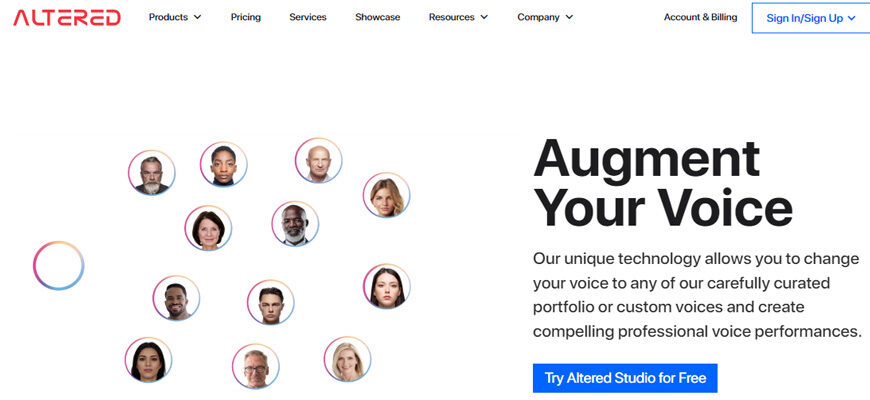
Altered.studio offers a next-generation audio editor with voice AI technology that promises to revolutionize the way audio content is created, edited, and optimized. The platform leverages the power of artificial intelligence to provide users with a range of innovative tools and features that make audio editing faster, easier, and more efficient.
Description
With the voice AI technology in Altered.studio, users can perform a variety of tasks, such as speech-to-text transcription, voice synthesis, and voice cloning. These capabilities allow users to quickly and easily transcribe audio content into text, create new audio content from text, and even clone the voice of a speaker for use in new recordings.
The platform also provides users with a range of powerful audio editing tools that make it easier to edit and optimize audio content. These tools include features such as noise reduction, equalization, and volume control, which help users to create high-quality audio content that is optimized for their target audience.

Pros and Cons
Pros of Altered studio’s:
- Improved efficiency: The voice AI technology in Altered.studio’s audio editor provides users with a range of capabilities that make audio editing faster, easier, and more efficient. This can save users time and allow them to focus on other aspects of their work.
- Innovative tools: The platform provides users with a range of powerful audio editing tools that make it easier to edit and optimize audio content. These tools help users create high-quality audio content that is optimized for their target audience.
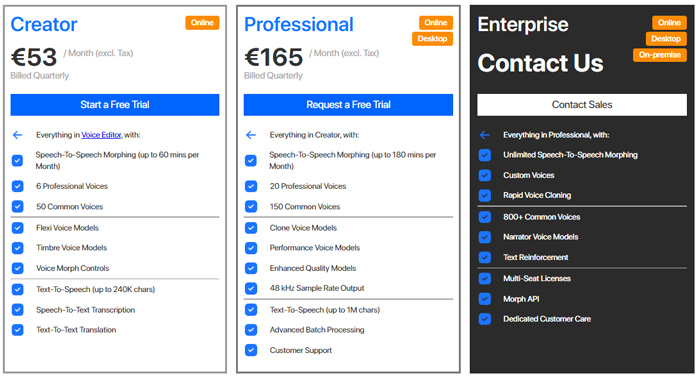
- Cost-effective: Altered.studio offers a cost-effective solution for creating, editing, and optimizing audio content. This can be particularly beneficial for businesses and individuals who work with audio content on a regular basis.
- User-friendly: The platform has a user-friendly interface that makes it easy for users to access and utilize the voice AI technology and audio editing tools. This can help users get up and running quickly and start seeing the benefits of the platform in a short amount of time.
Cons of Altered.studio’s :
- Technical knowledge: In order to fully utilize the platform and its voice AI technology and audio editing tools, users may need to have a certain level of technical knowledge. This could be a challenge for some users who are not familiar with audio editing software.
- Dependence on AI: This app is dependent on the accuracy and reliability of the AI technology. If the technology is not performing optimally, users may experience reduced efficiency and less accurate results.
- Cost: While Altered.studio provides a cost-effective solution for audio editing, some users may still find the cost to be a barrier, particularly for smaller businesses or individuals who work with audio content on a limited basis.
How to use
How to use step by step this app:
- First, you can visit the Altered Studio website at altered.ai. There, you can learn more about the features and pricing of this tool.
- To get started with “Altered Studio”, you can sign up for a free trial. This will give you access to a powerful, feature-packed voice AI studio that you can use to record performances from anywhere or import your performance from your browser or your desktop.
- Once you have access, you can create a whole multi-character production by yourself. You can drive engaging performances, from whispered secrets to shouted commands, all using speech synthesis technology.
- This app also allows you to modify and save your preferred voice settings as presets for easy access in the future. You can even create multiple variant presets for each voice.
- If you need help learning how to use it, there are resources available on their website. These resources include a knowledge base that provides all the information you need to get started with Altered Studio .
- Additionally, there are several tutorial videos available on YouTube that can guide you through the process of using it. These videos include step-by-step instructions on how to deepfake your voice and create professional multi-character performances.
The 10 Best Alternatives
If you’re looking alternative audio editors with voice AI technology, here are some of the best options available based on the provided search results:
- Adobe Audition: Adobe Audition is considered the best audio editor overall. It features powerful editing tools and voice AI technology that allows users to easily remove unwanted noise, enhance vocals, and create realistic voiceovers.
- Auphonic: Auphonic is an AI-powered audio editor that automatically enhances audio quality, reduces noise, and optimizes loudness. It is especially useful for podcasters and broadcasters who need to quickly process large amounts of audio content.
- Descript: Descript is another AI-powered audio editor that allows users to edit audio by editing text. Its voice AI technology can even generate synthetic voiceovers that sound like the original speaker.
- Podcastle: Podcastle is an online audio editor that features voice AI technology to help users quickly edit and produce high-quality podcasts. It offers a wide range of editing tools, including automated noise reduction and volume leveling.
- Krisp: Krisp is an AI-powered noise cancelling app that can be used with any audio editor to remove background noise from voice recordings. It is especially useful for remote workers who need to record audio in noisy environments.
- Resemble: Resemble is an online AI-powered voice generator that allows users to create custom synthetic voices for voiceovers, chatbots, and other applications. It can be integrated with various audio editors and platforms.
- Murf: Murf is an AI-powered voice generator that allows users to create realistic synthetic voices with customizable accents and emotions. It can be used for voiceovers, chatbots, and other applications.
- Cleanvoice: Cleanvoice is an AI-powered noise reduction app that can be used with any audio editor to remove background noise from voice recordings. It uses advanced algorithms to remove noise while preserving the original voice quality.
- ClipChamp: ClipChamp is an online video editor that features voice AI technology to help users quickly edit and produce high-quality videos. It offers a wide range of editing tools, including automated noise reduction and volume leveling.
Lexis Audio Editor: Lexis Audio Editor is a user-friendly audio editor available for Windows 10 that allows users to create new audio records or edit audio files. It features a simple and easy-to-use interface and allows users to easily edit and enhance audio files with voice AI technology.
| Audio Editor | Pricing | Features |
|---|---|---|
| Auphonic | Starts at $11.25/month | Automatic audio post-production, audio enhancement, and audio file format conversion |
| Descript | Starts at $15/month | AI transcription, voice editing, and audio effects |
| Trint | Starts at $44.25/month | Automated transcription, audio search, and collaboration tools |
| Podcastle | Starts at $15/month | AI-powered audio editing, automatic mastering, and transcription |
| Krisp | Starts at $5/month | Noise cancellation for audio calls, recordings, and streaming |
| SimonSays | Pay-as-you-go pricing | AI transcription, translation, and subtitle creation |
| Resemble | Starts at $9/month | Text-to-speech and voice cloning |
| Murf | Free with limited features, paid plans start at $9/month | AI-powered audio processing, audio effects, and audio repair |
| Cleanvoice | Free with limited features, paid plans start at $4.99/month | AI-based noise reduction, audio repair, and audio enhancement |
| ClipChamp | Starts at $9/month | AI-based audio mastering, noise reduction, and audio enhancement |
Conclusion
Overall, Altered.studio’s next-generation audio editor with voice AI technology is a game-changer for businesses and individuals who work with audio content. With its range of innovative tools and features, the platform offers a fast, efficient, and cost-effective solution for creating, editing, and optimizing audio content.
Whether you are a podcaster, voiceover artist, or simply someone who wants to improve the quality of your audio content, this application is the solution you have been looking for.

FAQ
How do you rate this tool?